
QA Automation • June 4, 2026
How to Fix Flaky Tests: A Practical Guide for QA Teams
Flaky tests erode CI trust and hide real bugs. Learn common causes, a practical fix playbook for Playwright-style suites, and how E2Easy run history, categorized errors, and video replay speed up debugging.
A flaky test passes and fails on the same code without a clear product change. One run is green, the next is red, and nobody can explain why. Teams re-run pipelines until they get lucky, mute failing jobs, or stop trusting automation altogether. When that happens, real regressions slip through because nobody investigates "maybe flaky" failures anymore.
For QA and engineering leads, flaky tests are not noise - they are a quality defect. This guide covers what causes instability, how to fix it in traditional and no-code suites, and how a workspace built for evidence makes the last mile of debugging much faster.
Two tracks: prevent flakes and debug failures
Most flaky-test work splits into two parallel tracks. Prevention reduces how often tests flip red without a real bug. Debugging shortens the time from a failed run to a confirmed root cause. You need both; fixing selectors does not help if nobody can see what failed in CI.
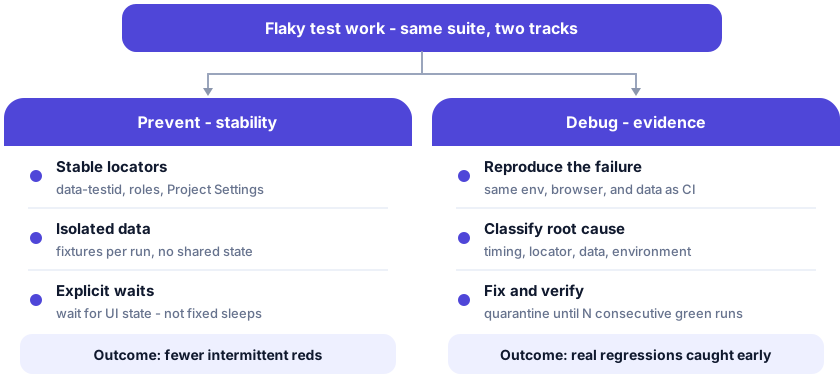
The sections below follow this layout: causes and playbook first (prevention), then why evidence matters and how E2Easy supports the debug track.
What makes a test flaky?
Flakiness means non-deterministic results: same build, different outcome. The root cause is rarely random bad luck. It is usually timing, state, or environment.
Async UI and timing. Single-page apps load data after paint. Tests that click before a button is enabled, or use fixed sleep(3000) instead of waiting for a stable condition, race the UI. Playwright's waitFor and Cypress retries help - but only when applied at the right step.
Brittle selectors. CSS classes and deep XPath break when marketing ships a redesign. A locator that matched yesterday's DOM fails today with "element not found" - classic flake behavior in coded E2E.
Shared data and test order. Tests that reuse the same user account, cart, or database row interfere with each other. Parallel CI makes order-dependent suites worse.
Environment drift. Staging has feature flags your CI runner does not. Time zones, locale, viewport, and third-party sandboxes (payments, maps, auth) behave differently between local, CI, and production-like envs.
Network and dependencies. Slow APIs, rate limits, and external scripts (analytics, chat widgets) introduce intermittent failures that look like test bugs.
Industry surveys often cite a large share of automated failures as flaky rather than true regressions - sometimes on the order of up to 30% in mature pipelines. Even if your team is below that, one ignored flake tends to become ten.
A practical fix playbook
Whether you maintain Playwright scripts or visual no-code tests, the playbook is the same: measure, isolate, fix the cause, then prove stability.
- Track flake rate - Tag or quarantine tests that fail without a linked code change. Do not merge "re-run until green" as policy.
- Isolate data - Unique users, orders, and fixtures per run. Reset state in setup and teardown.
- Stabilize locators - Prefer
data-testidor role-based selectors. - Replace arbitrary waits - Wait for visible text, network idle, or a specific API response - not a hard-coded pause.
- Fix one root cause per ticket - Timing fix and selector fix are different work items. Close the ticket only after N consecutive green runs in CI.
- Re-run in the failing environment - A flake that only appears on CI needs CI logs and artifacts, not only a passing local run.
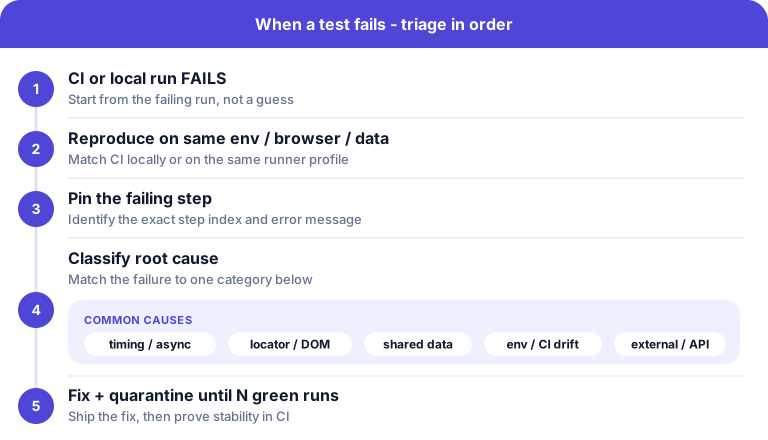
Symptom → cause → fix
| Symptom | Likely cause | What to do |
|---|---|---|
| Fails only on CI, passes locally | Resource limits, parallel contention, missing env vars | Match CI browser/viewport; isolate parallel data; inject secrets consistently |
| Fails on first run, passes on retry | Race on async UI or lazy-loaded chunk | Explicit wait on element/state; remove fixed sleeps |
| "Element not found" after unrelated UI deploy | Brittle selector | Add stable test IDs; update locator or re-record the step |
| Passes alone, fails in full suite | Shared state or order dependency | Independent fixtures; avoid static "last created" IDs |
| Intermittent 5xx or timeout | Network or third-party dependency | Mock or stub service; assert on contract; widen timeout only after root cause is known |
| Assertion on text that changes (dates, counts) | Non-deterministic expected value | Anchor on structure, use regex, or generate expected data in setup |
Why debugging still stalls
Fixing flakes is half the battle. The other half is knowing what actually failed when someone was not watching the run.
Manual re-test means a QA engineer reproduces the flow from memory or a ticket description - slow, and easy to diverge from what CI saw. Log-only automation (stack traces, DOM dumps) helps engineers but still leaves gaps: which step, which screen, what did the user see?
Without video, screenshots, and categorized errors tied to the run, teams debate whether the failure was real, rerun blindly, or assign "investigate flake" stories that age in the backlog.
How teams debug failures today
| Approach | Time to diagnose | Who can use it | Artifacts on failure |
|---|---|---|---|
| Manual re-test | Hours; repeats every release | Anyone; does not scale | Whatever the tester remembers |
| Coded E2E (logs / traces only) | Hours for non-authors | Engineers comfortable with Playwright/Cypress | Stack trace, trace file; video if you wired it up |
| E2Easy (workspace + extension) | Minutes for QA and eng | QA, PM, developers | Run history, step-level errors, screenshots, optional video replay |
Reduce flakes and debug faster with E2Easy
E2Easy combines a Chrome extension and a workspace. Tests, folders, credentials, variables, and run history live in one project whether you recorded in the browser or built flows another way. That matters for flaky-test work: prevention and diagnosis happen in the same place.
Where the two tracks land in the product:
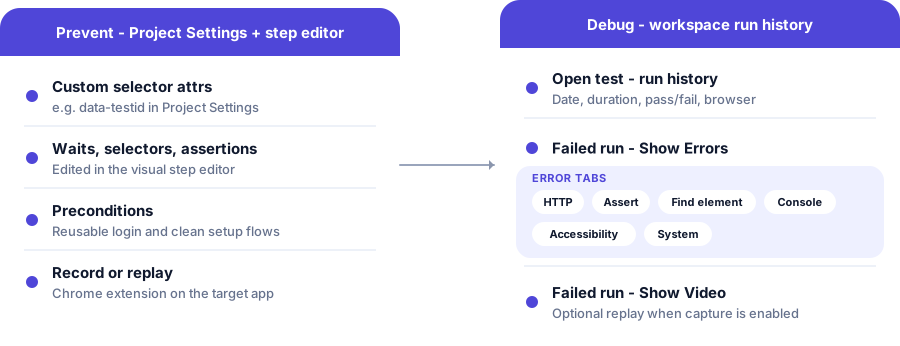
Prevent instability before it spreads
- Custom selector attributes in Project Settings (for example
data-testid) so steps target stable elements after UI changes. - Visual step editor - adjust waits, selectors, and assertions without rewriting a Playwright file; re-record only when the flow itself changed.
- Preconditions - reuse login and setup flows so every test starts from a clean, known state.
- Assertions during recording or in the editor - catch wrong pages early instead of failing three steps later on a timeout.
See E2Easy Documentation for recording, playback, and troubleshooting when layout or timing drifts.
When a run fails, use evidence - not guesswork
Open the test in your workspace and review run history: each run shows date, duration, pass/fail status, and browser. For a failed run:
- Show Errors opens a categorized report: HTTP, Assert, Find element, Console, Accessibility, and System. Filter by tab, read the message, and open per-error screenshots when captured.
- Show Video replays the session when video capture is enabled on playback - useful for timing issues and "what was on screen?" questions.
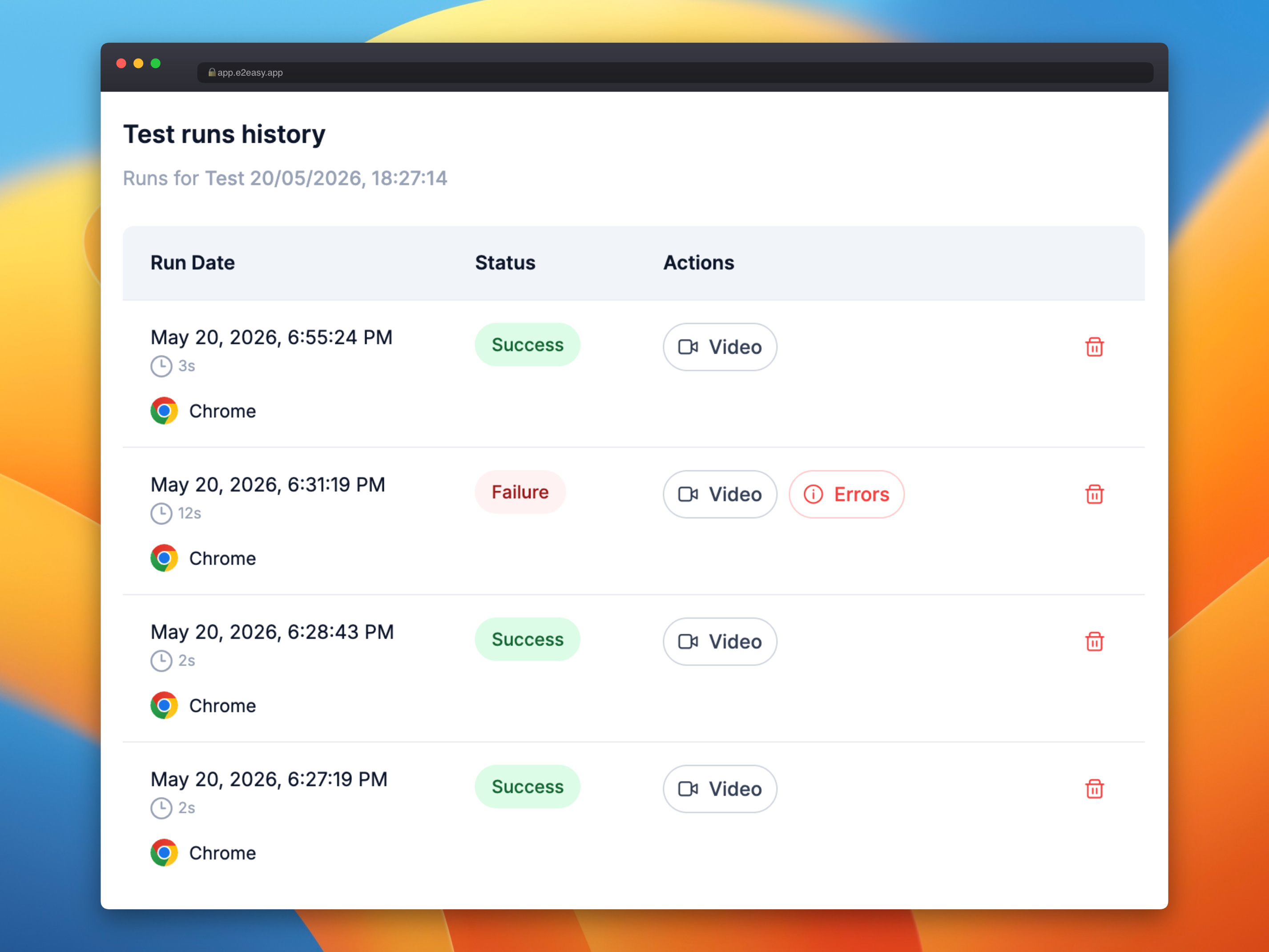
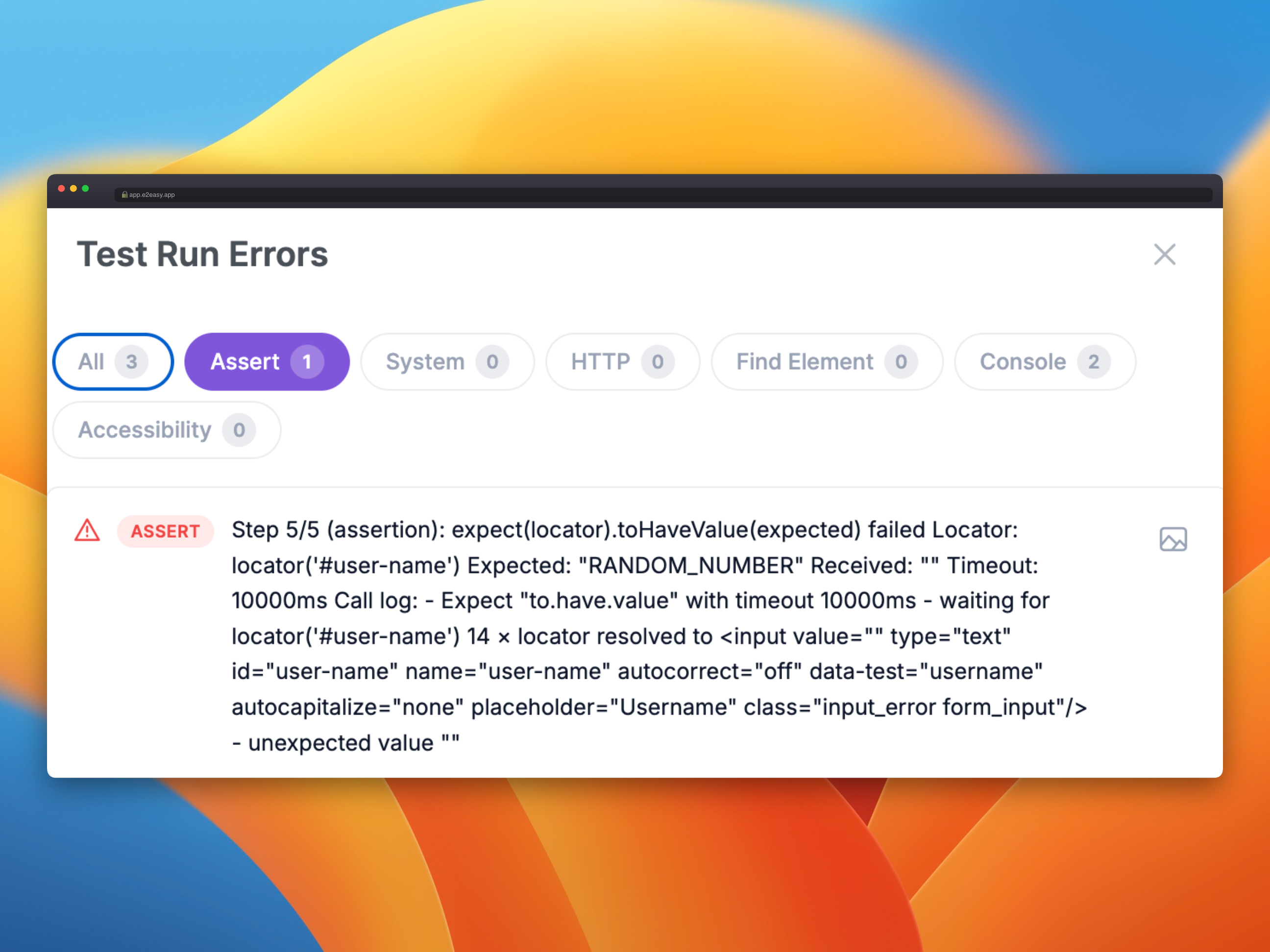
QA can hand engineers a failing step, screenshot, and recording link instead of a vague "checkout test is flaky." Developers still fix the app; the platform removes the archaeology.
Start treating flakes as fixable
Flaky tests are a process problem and a tooling problem. Quarantine offenders, fix root causes, and insist on artifacts for every CI failure. If your team spends more time re-running than repairing, move diagnosis into a workspace designed for it.
Ready to stop re-running flaky tests and start fixing root causes? Open E2Easy to run your flows, review step-level errors, and debug faster with screenshots and video replay in one workspace.
Author: E2Easy Team | Date: June 4, 2026